Back

Need for Speed AI Trend: Your Car in the Movie Scene

Add one photo of your car or truck. AI puts it in the trend's movie-style street scene: it rolls through town, spins burnouts in thick tire smoke while people watch, and rolls away, with the trend's own sound.

The original Need for Speed AI reel by @lakenyoungOriginal reel
  • 1 photo you add
  • 29 s clip with sound
  • 16:9 like the original clip
  • No watermark

No prompt to write: Add your photo and tap once

Create your own

Ready in up to several minutes · 442 credits

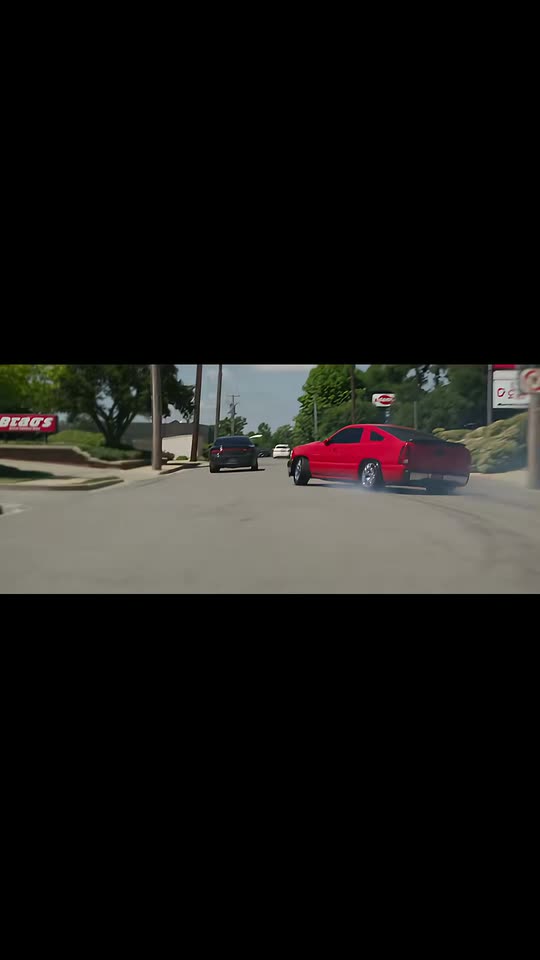
The Need for Speed AI trend puts a photo of your own car or truck into a car-movie street scene: it cruises through a small town, spins burnouts in a cloud of tire smoke while people stare from a patio, and drives off. People post it as "What did AI do to my truck". You need one photo of your vehicle.

Also called Need for Speed AI car swap · Need for Speed template · What did AI do to my truck · NFS AI video · Need 4 Speed AI

Example

What the Need for Speed AI video looks like

This is the post that started the trend, an AI video its creator made of his own truck. Your Movie scene result follows the same shots with your vehicle in place of the red car.

Original reel by @lakenyoung, 30 s

The original post by @lakenyoung (11 November 2026, 70,500 views): "What did Ai do to my truck". The AI kept his red paint and turned the pickup into a two-door sports car, burnouts and all.

Use this reference
Step by step

How to make the Need for Speed AI video on MakeViral

Everything runs in the browser. No editing app, no prompt to write, no watermark.

  1. Add your photo

    Press "Create your own" and add your car or truck, the whole vehicle from a front corner. Take it with the camera or pick it from your library.

  2. Press Generate

    The button shows the price. Seedance 2.5 puts your photos into the Need for Speed AI trend clip and copies it shot by shot for about 29 seconds, in two parts joined at a cut of the reel, with the reel's full original song. You write no prompt.

  3. Download or share

    The video is ready in up to several minutes as a 16:9 MP4. Download it, share it from your phone, or find it later in My videos.

Which photo works best?

Upload one sharp photo of your whole vehicle: a car, pickup truck, SUV or van.

  • Front corner view. Stand at a front corner so the photo shows the front and one side, from the roof to the tires. The scene shows your vehicle from the front, the side and behind, so the shape and the paint matter most.
  • Daylight, no crowd. Park it alone in good light. People in the photo are left out. A photo at night or under colored lights can change how the paint looks in the video.
  • Special backs. A tow boom, a dump bed or a utility body is drawn from what your photo shows. Pick a front-corner photo that also shows part of the back.
  • Mods count. The lift, the wheels, the bumpers, racks and light bars carry over, so keep them in the picture.
  • Badges and plates: the video leaves out badges, emblems and the number plate, so you can post it without showing your plate.
  • Use a photo of your own vehicle, or one whose owner said yes.

Where did the Need for Speed AI trend start?

The trend started with one post. On 11 November 2026, the truck owner @lakenyoung shared an AI video of his red pickup dropped into a movie-style street scene, with the line "What did Ai do to my truck" and #needforspeed. The joke: the AI kept the red paint but turned his pickup into a low two-door sports car halfway between a truck and a muscle car. It reached 70,500 views and 5,334 likes in three days.

On 12 November, tutorial accounts reposted his clip as a Need for Speed AI video tutorial (161,500 views for the first one; @lakenyoung answered "Bro this is my video") and pointed people to a Kling app template: paste the video link, replace one photo with your car, generate. By 14 November #needforspeedaitrend and #needforspeedaicar had about 80 videos each and more than 330,000 views, and more than ten new tutorial copies came out on 13 November. Posters call it the Need for Speed scene, after the street-racing films and games, and the most common complaint under the tutorials is that the app template gives everyone the movie car instead of their own.

  1. @lakenyoung posts "What did Ai do to my truck", his pickup in an AI car-movie street scene, with #needforspeed; it has 70,500 views and 5,334 likes by 14 November. TikTok

  2. A tutorial account reposts the clip as "How to make a Need for Speed-style video with your car" and points to a Kling app template; it passes 161,500 views by 14 November. TikTok

  3. The hashtags #needforspeedaitrend and #needforspeedaicar start; by 14 November they have 80 videos (339,694 views) and 76 videos (337,096 views). TikTok

  4. More than ten new tutorial copies appear in one day, among them @tacy1094's, which shows the template's prompt on screen (32,700 views by 14 November). TikTok

Copy and paste

The Need for Speed AI prompt

You do not need these: the one-tap flow runs them for you, together with the trend clip. [Image 1] and [Image 2] are your two photos, and [Video 1] is the trend clip the video copies.

1 photo: your car or truck, the whole vehicle from a front cornerSeedance 2.529 s · 720p · 16:9442 credits
Video prompt

Only replace the main foreground vehicle with the vehicle from [Image 1]. Keep everything else in the video completely unchanged: original camera movement, shot composition, driving motion, speed, road, background, other cars, lighting, shadows, reflections, film grain, scene and action. Do not change anything else. Recreate [Video 1] shot for shot with the same camera angles, cuts, timing and moves: a sunny small-town car-movie scene with black bars at the top and the bottom. Keep every cut at the same second as in [Video 1]: 1.3, 2.3, 3.0, 4.7, 9.3 and 12.5 s. The ONLY change: the hero vehicle of [Video 1], the red car with the low two-door body and the truck-like front, is now the vehicle in [Image 1]. THE VEHICLE = the main vehicle in [Image 1], in EVERY shot, from the front, the side and behind, through a windshield and inside the smoke: copy it exactly (body shape, doors, cab, bed or trunk, paint, wheels, lights, grille, ride height, racks, tow gear or work body and every other part), so its owner knows it at once. A pickup keeps its own cab and bed. A work truck keeps its own back in every shot (flatbed, tow boom, box or utility body), never a plain pickup bed. A car loaded on its bed or a trailer behind it is NOT the vehicle: show an empty bed and no trailer. PAINT: the exact hue of [Image 1] in sunny daylight, also if [Image 1] was taken at night or under colored lights. Never grey, silver or white unless [Image 1] shows that color. It drives the same path, speed and distance from the camera as the red car in [Video 1] and does the same burnouts and slides. Take ONLY the vehicle from [Image 1]: never its background, sky, night or people. DIRECTION: the vehicle always drives forward, nose first, never in reverse. When it drives away from the camera we see its BACK (tailgate or trunk, tail lights, rear bumper), never its grille, headlights or hood. If [Image 1] does not show the back, build a plain back that fits the same vehicle, in the same paint. NEVER the red car of [Video 1]: NO red paint unless [Image 1] shows it, never its low two-door body or truck grille, never a mix of the two. The red car has a pickup-style tailgate: from behind it is still the hero vehicle and becomes the vehicle from [Image 1], also in shots 1, 4, 5 and 7. The RED PICKUP TRUCK in the background (far right in shot 2, behind the vehicle in shot 3, on the right in shot 7) stays exactly as it is. It is not in shot 4. Shot 1 [0-1.3 s]: the vehicle rolls slowly past a lawn and a low wall, seen from the side, then from behind. Shot 2 [1.3-2.3 s]: hard cut, from inside a following car, through its windshield: the vehicle comes TOWARD the camera on the left of the road, we see its FRONT. Shot 3 [2.3-3.0 s]: hard cut, through the side window: the vehicle passes close beside, its hood and side fill the right of the frame. Shot 4 [3.0-4.7 s]: quick cuts from inside the following car, past its driver's dark silhouette: the vehicle from [Image 1] is ahead in the windshield the whole time, driving AWAY from us, seen from the BACK: its tailgate or rear and tail lights toward the camera, never its front. Never the red car. Shot 5 [4.7-9.3 s]: hard cut to the street, a low camera behind a dark pickup (a background car, unchanged) that drives off to the right; the vehicle is ahead, its BACK to us; then it spins burnouts in the wide intersection by a restaurant, thick white tire smoke, sliding sideways. No in-car shot after 4.7 s. Shot 6 [9.3-12.5 s]: hard cut to the restaurant patio: adults at the railing turn and watch while the vehicle slides past behind them in its smoke. Shot 7 [12.5-14 s]: hard cut, from behind: the vehicle rolls out of the parking lot toward the street, its BACK to the camera. Exactly these 7 shots, no new shot. Exactly one vehicle looks like [Image 1]. No badges, emblems, brand names or lettering on the vehicle, no readable number plate, no text, no captions, no logos, no watermark.

3951 characters
How many credits does it cost?

You pay per video in credits, and the create page shows the exact price on the Generate button before you spend anything. The one-tap price covers the video, made in one step from your photos and the trend clip, charged once. One video is 442 credits, so the smallest one-time pack that covers it is $39.99 for 450 credits, with no subscription. The cheaper models are there if you run the prompts by hand in AI Video.

Video modelSettingsCredits
Seedance 2.5 (this template)29 s, 720p, copies the trend clip, one tap442

One-time packs and plans are on the pricing page. A failed video gives its credits back.

What happens in the Need for Speed AI video?

The Movie scene version copies the trend's own clip shot for shot, with your vehicle in place of the red car:

SecondsWhat you see
0 to 1Your vehicle rolls slowly past a lawn, from the side, then from behind
1 to 5Quick cuts from inside a car that follows it: it comes toward you, passes close beside, then drives ahead in traffic
5 to 9Your vehicle spins burnouts in an intersection, thick white tire smoke pouring off the rear wheels
9 to 12People on a restaurant patio turn and watch it slide past
12 to 14It rolls out of the lot toward the street
14 to 16It stops at a gas station and rolls out
16 to 22A car follows it through town
22 to 26It burns out on the main street in thick smoke
26 to 29A man in a car cheers and the smoke fills the lot

The result is about 29 seconds, the whole trend clip, made as two AI clips joined at a cut. Pick 14 s for the first half at about half the price. It is wide like a film (16:9 with black bars at the top and the bottom), so it looks like the trend posts on TikTok, where the black space above the clip holds your caption. The trend's own sound plays on it, and you can turn it off on the result screen. It is made with top-quality AI video models, including Seedance 2.5, and takes 5 to 20 minutes. The create page shows the exact price on the Generate button.

Full trend or 14 s: which length should you pick?

Both take one photo of your vehicle and copy the first post shot for shot, with the trend's own sound.

  • Full trend is the whole 29-second clip: the drive through town, the burnouts in front of the patio crowd, the gas station and the last burnout on the main street. Pick it for the "What did AI do to my truck" joke as people post it.
  • 14 s is only the first 14 seconds: the drive through town, the burnouts at the restaurant and the roll-out. It is one AI clip, so it costs about half as much and is ready sooner.

Why does the app template turn every car into the movie car?

The Need for Speed AI template behind the tutorials is a Kling app video edit with one short prompt. The Need for Speed AI prompt on the tutorial screens reads: "Only replace the main foreground vehicle with the vehicle from Image1. Keep everything else in the video completely unchanged: original camera movement, shot composition, driving motion, speed, road, background, other cars, lighting, shadows, reflections, film grain, scene and action. Do not change anything else."

That keeps the scene, but it says nothing against the movie car, so many results keep its shape. Under the tutorials, people write that their car came out as the movie car with only their stickers on it. That is also the joke of the first post: a pickup turned into a sports car.

Our Movie scene version starts with the same prompt and adds what it misses: a full list of what to copy from your photo (the body shape, the cab and bed, the paint, the wheels, the lift), a ban on the red paint and the red two-door body of the original, "never a mix of the two", and the scene shot by shot. If you want the funny version, the first post is the proof that AI sometimes mixes them anyway.

How do you post it like the trend?

  • The line: "What did AI do to my truck" in the black space above the clip, like the first post. If your truck came out as your truck, try "Need for Speed scene with my truck".
  • Hashtags: #needforspeedaitrend, #needforspeedaicar and #needforspeed (about 810,000 TikTok videos).
  • Before and after: show a real photo of your car first, then your Need for Speed AI edit.
  • Keep the platform's AI label on, so nobody thinks you really did burnouts in a town intersection.
FAQ

Need for Speed AI trend questions

What is the Need for Speed AI trend?
It is a TikTok car trend from November 2026: an AI video puts your own car or truck into a car-movie street scene, cruising through a small town and spinning burnouts in tire smoke while people watch. It started with @lakenyoung's post "What did Ai do to my truck" on 11 November 2026.
How do I do the Need for Speed trend with my car?
Press "Create your own", pick Full trend or 14 s, add one photo of your whole car or truck and press Generate. The video lands in My videos. You need no app template, no video link and no prompt.
What is the Need for Speed AI prompt?
The app template that the tutorials use says: "Only replace the main foreground vehicle with the vehicle from Image1. Keep everything else in the video completely unchanged: original camera movement, shot composition, driving motion, speed, road, background, other cars, lighting, shadows, reflections, film grain, scene and action. Do not change anything else." People also call it the NFS AI prompt. Our Movie scene version starts with those words and adds the shot list and the rules that keep your own vehicle, so you have no NFS AI prompt to write.
Does the Need for Speed AI car swap work for trucks?
Yes. The trend started with a pickup, so a Need for Speed AI truck video is the original joke. The version takes any car, pickup truck, SUV or van. The prompt keeps a pickup a pickup with its own cab and bed, and keeps your lift, wheels and add-ons.
Will it look like my car, or like the movie car?
The prompt copies your vehicle's shape, paint, wheels and lights from the photo and bans the red two-door car of the original, so it is written to keep your car. AI can still mix the two now and then, as in the first post. A sharp photo of the whole vehicle from a front corner gives the best match. Every run comes out a little different.
Is it a real scene from the Need for Speed movie or game?
No. Every shot of the NFS AI video is AI-made: the town, the onlookers, the smoke and your vehicle. The trend took its name from the street-racing films and games because the clip looks like one. MakeViral has no link to the film or the games.
Is there a CapCut Need for Speed template or a Kling one?
The tutorials send people to a Kling app template, and some tag CapCut too; you paste the trend's video link and swap one photo. Under the tutorials, people say the result often keeps the movie car or stops before it finishes. On MakeViral you need no app and no template: one photo, and the video lands in My videos.
Is there a Need for Speed AI meme or tutorial I should watch first?
You do not need one. The Need for Speed AI tutorial videos on TikTok all show the same app steps. Here you add one photo and press Generate. The meme line people post with it is "What did AI do to my truck".
Why is the Movie scene video wide?
The trend clip is filmed like a movie, wide with black bars. Your result keeps that frame (16:9 with the black bars), so on TikTok it looks exactly like the trend posts, with room above the clip for your caption.
Does the video have sound?
Yes. The video carries the trend's own sound from the first post. You can turn it off on the result screen.
Can I put my car in a movie scene other than this one?
This page makes the Need for Speed scene. For other AI car swap videos, see the night car edit and the police chase pages linked below.
Why are the badges and the number plate gone?
The video leaves out badges, emblems, lettering and the number plate on purpose. Your vehicle stays recognizable by its shape, color, wheels and mods, and you can post it without showing your plate to strangers.
Is "Need 4 Speed AI" the same trend?
Yes. Some tutorials write it as Need 4 Speed AI, and the Need for Speed scene AI posts on TikTok are the same trend.
Does it cost credits?
Yes. The create page shows the exact price on the Generate button before you spend anything. If a run fails, the credits come back.
Is my photo private?
Yes. MakeViral does not post your photo or the result anywhere or show them to other users. The video goes to your private My videos page, and you can delete it there at any time.

Make your own Need for Speed AI video

Add one photo and tap once. No prompt to write. 442 credits.

No watermark. A failed video gives its credits back. Secure checkout by Stripe.