Back

GTA 5 Goodbye AI Trend: The Farewell on the Sunset Pier, Starring You

"Take care, kid." Add one photo, and the three men on the sunset pier shake your hand, give you a parting gift and watch you drive off in the pink sports car, with the scene's own sound.

The original GTA 5 Goodbye reel by @HiggsfieldOriginal reel
  • 1 photo you add
  • 14 to 29 s clip with sound
  • 16:9 like the original clip
  • No watermark

No prompt to write: Add your photo and tap once

Create your own

Ready in up to several minutes · From 213 credits

The GTA 5 goodbye AI trend is a farewell to Los Santos before the next game in the series arrives: in a game-style clip, the three GTA 5 leads say goodbye to a young man on a sunset pier, and he drives off in a pink sports car. Add one photo, and you or your pet take his place.

Also called Goodbye Los Santos · GTA 5 farewell · GTA 5 Goodbye AI filter · Sunset Pier Swap · GTA goodbye trend · GTA 5 goodbye desert highway · GTA 5 to GTA 6 handover · Passing the torch GTA trend

Example

What the GTA 5 Goodbye video looks like

This is the trend's template clip, made with another tool, not a MakeViral result. Your video copies the same pier scene with your photo in the young man's place, and no two runs come out the same.

Original reel by @Higgsfield, 30 s

The Sunset Pier Swap clip, made with Higgsfield: a bald, bearded man in a black hoodie takes the young man's place. The three men shake his hand on the pier at sunset, he holds back tears, finds two game cases in the pink sports car and drives off down the beach road. Human puts you in his place. Shown: the whole 30-second clip.

Use this reference
Original reel by @qordo_o, 27 s

The original Desert highway reel by @qordo_o (13 November 2026, 186,200 views): a young man drives an old white convertible down a desert highway at sunset. A biker salutes, a man in a suit nods from a black car, a man in a red pickup stands up and waves, and he laughs, wipes a tear and drives on alone into the sunset. Desert highway puts you or your pet at the wheel. Shown: the whole 27-second reel with its sound.

Use this reference
Original reel by @artemiscc_capcut, 14 s

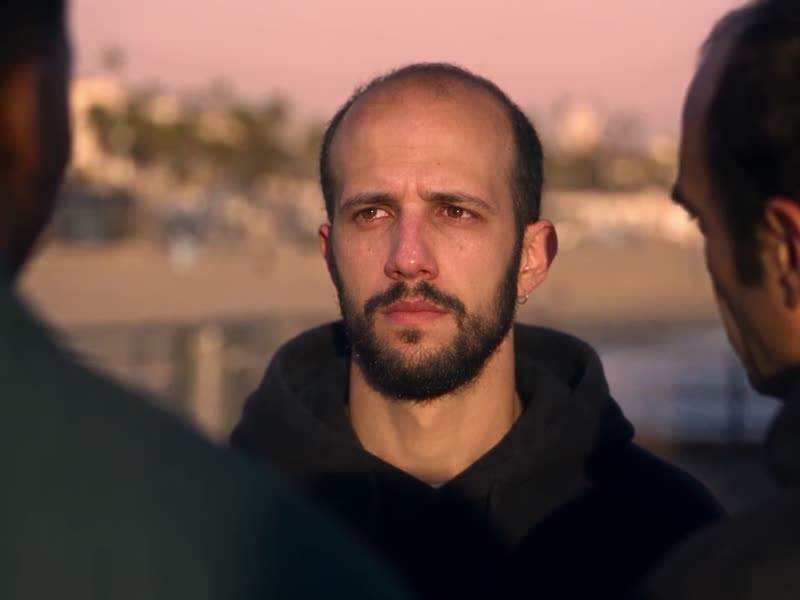
The Welcome GTA 6 template clip by @artemiscc_capcut (16 November 2026, 38,600 views): the three men say goodbye to a young man on the beach at sunset, then a hard cut takes him to a sunny palm-lined street, where a new pair joins him and all three pull up black bandanas. Welcome GTA 6 puts you or your pet in his place. Shown: the whole 14-second clip with its sound, cropped above the game logo that the template adds.

Use this reference
Original reel by @allabout0106, 39 s

The original Desert road reel by @allabout0106 (12 November 2026, 422,300 views): a young woman and a young man stand on an empty desert road at sunset while the old crew faces them. She says "You did good.", he says "We've got it from here. Go. They're waiting for you.", and the crew walks off arm in arm into the setting sun as See You Again plays. Desert road puts the two of you, or your pets, in their place. Shown: the whole 39-second reel with its sound.

Use this reference
Step by step

How to make the GTA 5 Goodbye video on MakeViral

Everything runs in the browser. No editing app, no prompt to write, no watermark.

  1. Add your photo

    Press "Create your own" and add you, face clear. Take it with the camera or pick it from your library.

  2. Press Generate

    The button shows the price. Seedance 2.5 puts your photos into the GTA 5 Goodbye trend clip and copies it shot by shot for about 28 seconds, in two parts joined at a cut of the reel, with the reel's full original song. You write no prompt.

  3. Download or share

    The video is ready in up to several minutes as a 16:9 MP4. Download it, share it from your phone, or find it later in My videos.

Which photo works best?

Upload one photo: of yourself for Human, of your pet for Pet.

  • Human: one person, face to the camera, sharp and in good light, from the waist up. The video keeps your face, your hair and the clothes in your photo, so wear what you want to wear on the pier.
  • The scene has a teary close-up of your face, so a clear, front-facing photo works best. No sunglasses, no hat that hides the face and no beauty filter.
  • Pet: one animal, head and chest in view, eyes open, in daylight. It sits upright where the young man stands and gives a paw for the handshakes.
  • Any background works: the pier, the three men and the car come from the scene.
  • Use your own photo, a friend who said yes, or your own pet. Never a celebrity or a stranger.

Where did the GTA 5 Goodbye trend start?

The next game in the series comes out on 19 November 2026, and in the week before it, players started saying goodbye to GTA 5 and Los Santos. On 10 November @alexander__lyrics posted a "Good bye Los Santos" edit set to See You Again; it has 2 million views. On 12 November @allabout0106 posted an AI-made clip of the three GTA 5 leads walking off into the sunset (244,400 views), and on 14 November a GTA 5 goodbye edit by @musicmediaco passed 4.1 million views.

The goodbye GTA 5 AI clips followed at once. From 14 November, a GTA 5 goodbye template on CapCut put your photo into a farewell with the three leads (one post has 387,600 views), and tutorials call it the "GTA 5 Goodbye AI trend". The #gta5goodbyetrend hashtag was created on 16 November.

This page copies the farewell on the sunset pier, a scene that Higgsfield users share as the Sunset Pier Swap. The three men say "Take care, kid.", shake hands and give the young man a game; he answers "Thanks." with tears in his eyes, gets into a pink sports car, finds two game cases on the seat and drives off down the beach road.

  1. Rockstar Games moves the release of the next game in the series to 19 November 2026. TechRadar

  2. @alexander__lyrics posts a "Good bye Los Santos" edit set to See You Again. It has 2 million views and 302,300 likes by 17 November. TikTok

  3. A "Goodbye GTA 5" edit by @musicmediaco passes 4.1 million views, and a CapCut "GTA filter" template post that puts your photo into a farewell with the three leads gets 387,600 views. TikTok

  4. The #gta5goodbyetrend hashtag is created, and tutorials for the "GTA 5 Goodbye AI trend" open with the sunset pier scene. TikTok

  5. #goodbyegta5 holds 730 TikTok videos and 2.2 million views, and #gta5goodbye 382 videos and 606,000 views. TikTok

Copy and paste

The GTA 5 Goodbye prompts

You do not need these: the one-tap flow runs them for you, together with the trend clip. [Image 1] and [Image 2] are your two photos, and [Video 1] is the trend clip the video copies.

Human

1 photo: you, face clearSeedance 2.528 s · 720p · 16:9435 credits
Video prompt

Recreate the reference video [Video 1] shot for shot: the same sunset pier scene, the same 4 shots with hard cuts at 3.67 s, 5.58 s and 9.38 s, the same camera angles, timing and moves, and the same warm golden-hour light and cinematic look. Normal real-time speed. The ONLY change: the young man with messy dark hair in an open teal shirt, who says goodbye to the three men, is now the person in [Image 1]. Everybody else stays exactly as in [Video 1]. THE YOUNG MAN = the person in [Image 1]. Use [Image 1] as the exact identity and appearance guide in EVERY shot: copy the exact face from [Image 1] (the face shape, eye color and eye shape, eyebrows, nose, mouth, skin tone, age, hair color, hair length and hairstyle, and any beard, moustache, glasses or freckles) exactly as in the photo, and preserve the exact facial structure, hairstyle, clothing, accessories, skin tone and body proportions from [Image 1]. Do not add a beanie, hoodie or any clothing that is not present in [Image 1]. NO messy dark fringe, no open teal shirt and no khaki trousers unless [Image 1] shows them; glasses only if [Image 1] shows them. The same person from the first frame to the last, also from the side, in close-ups and with teary eyes. Never morph, never drift back to the original young man's face. ART STYLE AND VISUAL INTEGRATION: the same lighting, texture and visual quality as the scene, no plastic-looking skin, no exaggerated anime proportions, no pasted-on look. The person fits the scene's perspective, scale and camera angles, with the same identity and outfit in every frame. Do not redesign, simplify or reinterpret any defining feature from [Image 1]. SHOT 1 (0.00-3.67 s): wide, the wooden pier at sunset, the sea and the low sun behind. THE YOUNG MAN stands second from the left; he shakes hands with the man in the dark suit on the right. The bald man in the white T-shirt stands on the left, the man in the dark green shirt behind. A short goodbye line at 1.5-3.5 s. SHOT 2 (3.67-5.58 s): close-up: THE YOUNG MAN's hand holds a game case with a colorful cover, a parting gift. SHOT 3 (5.58-9.38 s): low angle on the pier, a pink-and-blue sports car parked behind. THE YOUNG MAN on the right shakes hands with the man in the dark green shirt. The bald man in the white T-shirt is in the left foreground, the man in the dark suit behind them. SHOT 4 (9.38-13.04 s): wide from behind the hood of the pink sports car: the young man and the three men stand together at the pier railing against the sunset. Maintain the original cinematic storytelling, character interactions, background, environment and lighting: the three men keep their own faces and clothes, and the pier, the railing, the sea, the skyline, the palm trees and the pink-and-blue sports car stay exactly as in [Video 1]. Nobody else appears. Normal anatomy, one head per body, five fingers on every human hand. No dialogue throughout the entire video. No background music. No added text, no subtitles, no logos, no watermark.

3002 characters

Pet

1 photo: your pet, face clearSeedance 2.528 s · 720p · 16:9435 credits
Video prompt

Recreate the reference video [Video 1] shot for shot: the same sunset pier scene, the same 4 shots with hard cuts at 3.67 s, 5.58 s and 9.38 s, the same camera angles, timing and moves, and the same warm golden-hour light and cinematic look. Normal real-time speed. The ONLY change: the young man with messy dark hair in an open teal shirt, who says goodbye to the three men, is now the pet in [Image 1]. Everybody else stays exactly as in [Video 1]. THE PET = the pet in [Image 1], in EVERY shot, in the young man's place: the same species and breed, face, eyes, ears, muzzle, fur colors, fur length and markings as in [Image 1], with the natural body volume and proportions of that animal: never flattened, squashed, stretched or merged with anything. A real animal with no clothes and no human hands; it sits or stands upright on its hind legs where the young man stands. Never a person, never the original young man's face. SHOT 1 (0.00-3.67 s): wide, the wooden pier at sunset, the sea and the low sun behind. THE PET stands second from the left; it sits upright and lifts a front paw, and the man in the dark suit on the right shakes the paw. The bald man in the white T-shirt stands on the left, the man in the dark green shirt behind. A short goodbye line at 1.5-3.5 s. SHOT 2 (3.67-5.58 s): close-up: THE PET holds a game case with a colorful cover between its front paws, a parting gift. SHOT 3 (5.58-9.38 s): low angle on the pier, a pink-and-blue sports car parked behind. THE PET on the right gives a paw to the man in the dark green shirt, who shakes it. The bald man in the white T-shirt is in the left foreground, the man in the dark suit behind them. SHOT 4 (9.38-13.04 s): wide from behind the hood of the pink sports car: the pet and the three men stand together at the pier railing against the sunset. Maintain the original cinematic storytelling, character interactions, background, environment and lighting: the three men keep their own faces and clothes, and the pier, the railing, the sea, the skyline, the palm trees and the pink-and-blue sports car stay exactly as in [Video 1]. Nobody else appears. Normal anatomy, one head per body, five fingers on every human hand. No dialogue throughout the entire video. No background music. No added text, no subtitles, no logos, no watermark.

2312 characters

Desert highway

1 photo: you or your pet, face clearSeedance 2.528 s · 720p · 16:9427 credits
Video prompt

Recreate the reference video [Video 1] shot for shot: the same golden-hour farewell drive on a desert canyon highway, the same 6 shots with hard cuts at 3.25, 4.63, 6.40, 8.40 and 10.82 s, the same camera angles, timing and moves, and the same warm cinematic light. Normal real-time speed. The ONLY change: the young man with curly dark hair in the green varsity jacket who drives the white convertible is now the subject of [Image 1]. Everybody else stays as in [Video 1]. THE DRIVER = the subject of [Image 1] (a person, a pet, a toy or anything else), in EVERY shot, in the same seat and at the same size. [Image 1] is the only reference for the driver; [Video 1] is only for the moves, the camera, the cars and the road. A person: use [Image 1] as the exact identity guide: copy the exact face from [Image 1] (the face shape, eye color and eye shape, eyebrows, nose, mouth, skin tone, age, hair color, hair length and hairstyle, and any beard, moustache, glasses or freckles), and preserve the exact facial structure, hairstyle, clothing, accessories, skin tone and body proportions. Do not add any clothing that is not present in [Image 1]. NO curly dark hair and no green varsity jacket with yellow stripes unless [Image 1] shows them. The same person in every frame, also in the mirror, from the side and with teary eyes. An animal keeps the species, breed, face, ears, fur colors and markings of [Image 1] with its natural body proportions, never flattened or stretched; it sits upright at the wheel, waves and wipes its eye with a paw, mouth closed, no human hands or clothes. Anything else keeps its own whole body, shape, colors and style, with no human body parts it does not have. Never morph, never drift back to the original young man's face. ART STYLE AND VISUAL INTEGRATION: the scene's lighting, texture and quality, no plastic-looking skin, no pasted-on look; the driver fits the scene's perspective, scale and camera angles. SHOT 1 (0.00-3.25 s): in the open white convertible, the rear-view mirror shows THE DRIVER's eyes; THE DRIVER tilts it, and it shows a biker far behind. SHOT 2 (3.25-4.63 s): past the chrome side mirror, the biker on a green motorbike raises a hand in a salute. SHOT 3 (4.63-6.40 s): side view: THE DRIVER at the wheel laughs and waves back; dry golden hills behind. SHOT 4 (6.40-8.40 s): over THE DRIVER's shoulder: the man in the dark suit in a black car alongside looks over and nods. SHOT 5 (8.40-10.82 s): from behind THE DRIVER through the windshield: a red pickup ahead raises dust. SHOT 6 (10.82-13.73 s): behind the red pickup: a man stands up in its open back and waves with both arms. Maintain the original cinematic storytelling, character interactions, environment and lighting: the biker, the man in the dark suit and the man in the red pickup keep their own faces and clothes; the cars, the motorbike, the road, the hills and the sunset stay exactly as in [Video 1]. Nobody else appears. Normal anatomy, one head per body. No dialogue throughout the entire video. No background music. No added text, no logos, no watermark.

3087 characters
Welcome GTA 6

1 photo: you or your pet, face clearSeedance 2.514 s · 720p · 9:16213 credits
Video prompt

Recreate the reference video [Video 1] shot for shot: a farewell on a beach at sunset, then one hard cut at 7.67 s to a bright palm-lined city street, the same camera angles, timing and moves, and the same warm cinematic game-like look. Normal real-time speed. The ONLY change: the young man with a short black beard in the black hoodie with the black crossbody bag is now the subject of [Image 1]. Everybody else stays as in [Video 1]. THE TRAVELER = the subject of [Image 1] (a person, a pet, a toy or anything else), in EVERY shot, in the young man's place. [Video 1] is only for the moves, the camera, the other people and the places. A person: use [Image 1] as the exact identity guide: copy the exact face from [Image 1] (the face shape, eye color and eye shape, eyebrows, nose, mouth, skin tone, age, hair color, hair length and hairstyle, and any beard, moustache, glasses or freckles), and preserve the exact facial structure, hairstyle, clothing, accessories, skin tone and body proportions. Do not add any clothing that is not present in [Image 1]. NO short black beard, no black hoodie and no crossbody bag unless [Image 1] shows them. The same person in every frame, also from the side and from behind. An animal keeps the species, breed, face, ears, fur colors and markings of [Image 1] with its natural body proportions, never flattened or stretched; it stands upright, gives a paw for the handshakes and gets the hugs, mouth closed, no human hands or clothes; at the end its bandana is tied over its muzzle. Anything else keeps its own whole body and style, no human body parts it does not have. Never morph, never drift back to the original young man's face. ART STYLE AND VISUAL INTEGRATION: the scene's lighting and texture, no plastic-looking skin, no pasted-on look. SHOT 1 (0.00-7.67 s), one moving take on the beach at sunset, the sea and palm trees behind: the man in the grey suit shakes THE TRAVELER's hand and hugs THE TRAVELER; the man in the blue shirt and the bald man in the red plaid shirt stand beside them; the bald man shakes hands with THE TRAVELER and gives a big hug; the man in the blue shirt waves; at the end THE TRAVELER turns away from them and walks toward the camera. SHOT 2 (7.67-13.63 s): hard cut to a bright palm-lined street with pastel shops, a red sports car at the curb. Seen from behind, THE TRAVELER walks down the street; a young woman with a dark ponytail in a white crop top and beige cargo pants and a man in a navy T-shirt step up beside THE TRAVELER. Both pull black paisley bandanas up over the nose and mouth, THE TRAVELER does the same, and the three stand side by side facing the camera. Maintain the original cinematic storytelling, character interactions, background, environment and lighting: the three men on the beach and the woman and the man on the street keep their own faces and clothes; the beach, the street and the cars stay as in [Video 1]. Nobody else appears. One head per body. No dialogue throughout the entire video. No background music. No added text, no logos, no watermark.

3063 characters

Desert road

2 photos: you, face clear (left) + your partner or friend, face clear (right)Seedance 2.529 s · 720p · 9:16450 credits
Video prompt

Recreate the reference video [Video 1] shot for shot: the same farewell on an empty desert road with power poles at sunset, the same 6 shots with hard cuts at 1.42 s, 2.83 s, 5.29 s, 6.88 s and 10.88 s, the same camera angles, timing and moves, and the same warm golden-hour light and cinematic look. Normal real-time speed. The ONLY change: the young woman with the dark ponytail in the black leather jacket (on the left) is now the subject of [Image 1], and the young man with short dark hair in the dark leaf-print shirt (on the right) is now the subject of [Image 2]. The three men stay as in [Video 1]. STAR 1 = the subject of [Image 1], always on the LEFT (the woman's place). STAR 2 = the subject of [Image 2], always on the RIGHT (the man's place). Both change, also in wide and over-the-shoulder shots. Never blend their faces. [Video 1] is only for the moves, the camera, the men and the road. A person: use the image as the exact identity guide: copy the exact face from it (the face shape, eye color and eye shape, eyebrows, nose, mouth, skin tone, age, hair color, hair length and hairstyle, and any beard, moustache, glasses or freckles), and preserve the hairstyle, clothing, accessories, skin tone and body proportions. Do not add clothing that is not in the image. STAR 1: NO dark ponytail, leather jacket or necklace unless [Image 1] shows them. STAR 2: NO leaf-print shirt or watch unless [Image 2] shows them. The same person in every frame. Never drift back to the original woman's or man's face. An animal keeps the species, breed, face, ears, fur colors and markings of its image with natural proportions, never flattened; it stands upright in the star's place, no human hands or clothes. Anything else keeps its own whole body and style, no human body parts it does not have. ART STYLE AND VISUAL INTEGRATION: the scene's lighting and texture, no plastic skin, no pasted-on look. SHOT 1 (0.00-1.42 s): wide: three men stand on the road: a man in a grey suit, a man in a navy shirt, a bald man in a tan jacket. SHOT 2 (1.42-2.83 s): wide: STAR 1 (left) and STAR 2 (right) stand in the road, arms crossed. SHOT 3 (2.83-5.29 s): close-up of STAR 1 over a man's shoulder: a small smile; the lips say "You did good." at 3.9-4.7 s. SHOT 4 (5.29-6.88 s): over STAR 2's shoulder at the left edge: the three men on the road, the low sun behind. SHOT 5 (6.88-10.88 s): close-up of STAR 2, arms crossed, over a man's shoulder; the lips say "We've got it from here. Go. They're waiting for you." at 7.0-10.7 s. SHOT 6 (10.88-14.13 s): side view: the three men listen and nod. Maintain the original cinematic storytelling, character interactions, background, environment and lighting: the men keep their own faces and clothes; the road and the sunset stay as in [Video 1]. Nobody else appears. One head per body. The spoken lines are added later as sound. No background music. No added text, no logos, no watermark.

2930 characters

How many credits does it cost?

You pay per video in credits, and the create page shows the exact price on the Generate button before you spend anything. The one-tap price covers the video, made in one step from your photos and the trend clip, charged once. Each version has its own price: Human 435 credits, Pet 435 credits, Desert highway 427 credits, Welcome GTA 6 213 credits, Desert road 450 credits. The cheaper models are there if you run the prompts by hand in AI Video.

Video modelSettingsCredits
Human: Seedance 2.5 (this template)28 s, 720p, copies the trend clip, one tap435
Pet: Seedance 2.5 (this template)28 s, 720p, copies the trend clip, one tap435
Desert highway: Seedance 2.5 (this template)28 s, 720p, copies the trend clip, one tap427
Welcome GTA 6: Seedance 2.5 (this template)14 s, 720p, copies the trend clip, one tap213
Desert road: Seedance 2.5 (this template)29 s, 720p, copies the trend clip, one tap450

One-time packs and plans are on the pricing page. A failed video gives its credits back.

What happens in the GTA 5 goodbye video, shot by shot?

Your video copies the sunset pier scene shot for shot, with your photo in the young man's place. The three men, the pier and the car stay as they are in the scene.

TimeWhat happensWhat you hear
0 to 13 sWide on the pier at sunset: you shake hands with the man in the suit, hold a game as a parting gift, shake hands with the man in the green shirt, and all four stand at the railing."Take care, kid." and a soft score
13 to 20 sThe bald man puts a hand on your shoulder. A close-up of your face: wet eyes, a small nod."Thanks."
20 to 26 sYou sit in the pink sports car and pick up a game case; two game cases lie on the leather seat.The score
26 to 28 sThe three men watch the car drive off down the beach road.The score

How it works: the best AI video models available edit the scene itself. They swap the young man for the person or pet in your photo and keep everything else. You get 28 seconds at 720p in the scene's wide 4:3 frame, with the scene's own sound put back after the run, so the lines play over your video. It is made in two parts that are joined at a cut of the scene, and a run takes 5 to 15 minutes. The exact price shows on the Generate button before you spend anything. Every run is a new take, so results differ.

Human or Pet: which one should you make?

  • Human puts you in the young man's place: your face in the wide shots, in the handshakes, in the teary close-up and at the wheel of the pink sports car.
  • Pet puts your dog, cat or other pet in his place: it sits upright on the pier, gives a paw to each of the men, looks at the camera with wet eyes and sits in the driver's seat before the car drives off.
  • Desert highway is the other GTA 5 goodbye drive, the one set to See You Again (first posted by @qordo_o on 13 November 2026): you or your pet drive an old white convertible down a desert highway at sunset, the crew waves goodbye from a motorbike, a black car and a red pickup, and you take the road alone into the sunset. 27 seconds, wide, with the reel's See You Again soundtrack on the result.
  • Welcome GTA 6 is the "goodbye GTA 5, welcome GTA 6" transition of the GTA 5 to GTA 6 CapCut template (from 14 November 2026): the three leads say goodbye to you or your pet on the beach at sunset, then a hard cut takes you to a sunny GTA 6 Vice City style street, where a woman and a man in the look of GTA 6 Jason and Lucia join you and all three pull up black bandanas. 14 seconds with the clip's own sound.
  • Desert road is the two-photo handover from the @allabout0106 reel (12 November 2026, 422,300 views): you and your partner or friend stand on a desert road at sunset, tell the old crew "You did good. We've got it from here", and watch them walk into the sun. 29 seconds, square, with the reel's lines and See You Again.

Caption ideas: "Saying goodbye to GTA 5 like", "13 years in Los Santos, see you on the other side", "Goodbye GTA 5, hello GTA 6", "My dog is ready for the next game". Or write your own.

Want more game looks? Turn your photo into a GTA 6 loading screen, or make a retro clip with the PS2 filter.

What goes wrong, and how do you fix it?

ProblemFix
You look like the young man from the sceneHis face can come back, most often in the side shots and in the close-up. Use a sharp, front-facing photo and run it again.
You get a teal shirt or a dark fringeThose come from the scene's young man. The prompt bans them unless your photo shows them. Run it again.
The game covers look oddThe game cases are redrawn in every run, so their covers can change.
The mouth is a little off the wordsThe sound goes on after the run, and only two short lines are spoken. Run it again for a new take.
Your pet looks like a personUse a photo of one animal with its face and fur clear, then run it again.
The model refuses a photoSome photos get refused. The credits come back; try another photo.

Which sound, caption and hashtags should you post it with?

Your clip comes with the scene's own sound: "Take care, kid.", "Thanks." and a soft score, 28 seconds, so it is ready to post. The "Thanks." line uses a woman's voice when your photo shows a woman, and the Voice setting can change it. You can turn the sound off on the result screen. Many GTA 5 goodbye edits use See You Again by Wiz Khalifa and Charlie Puth instead; you can add it in the TikTok or Instagram editor. The sound belongs to its owner, and MakeViral gives you no rights to it.

Hashtags: #goodbyegta5 (730 TikTok videos and 2.2 million views on 17 November 2026), #gta5goodbye (382 videos), #gta5goodbyetrend (new on 16 November) and #gta6. Keep the platform's AI label on.

Keep it a tribute. Make it with your own face, your own pet or a friend who said yes. The game, its characters and its city belong to their owners: post it as a fan tribute, not as an ad.

FAQ

GTA 5 Goodbye trend questions

What is the GTA 5 goodbye trend?
It is a wave of edits and AI clips that say goodbye to GTA 5 and Los Santos before the next game in the series comes out on 19 November 2026. The AI version puts you into a farewell scene with the three GTA 5 leads. This page copies the sunset pier scene: they shake your hand, give you a game and watch you drive off.
Why is everyone saying goodbye to GTA 5?
Because the next game in the series comes out on 19 November 2026, after GTA 5 had been the main game of the series since 2013. Players post farewell edits, last drives through Los Santos and AI clips with the three leads in the week before the launch.
How do I make the GTA 5 goodbye AI video with my photo?
Press "Create your own", pick Human or Pet and add one clear photo. Press Generate; the button shows the price first. You get a 28-second clip of the pier farewell with the scene's own sound, and it waits in My videos when it is ready. You write no prompt.
Is this the GTA 5 Goodbye AI filter from CapCut?
It is the same trend. The GTA 5 goodbye CapCut template turns one photo into a short farewell edit, and each GTA 5 goodbye tutorial shows the steps for it. This page makes the full sunset pier scene instead: the handshakes, the teary close-up and the drive off, with your face in every shot.
Which prompt does this template use?
The prompt that the Sunset Pier Swap preset on Higgsfield ships with: use the photo as the exact identity guide, replace the young man, keep his face, hair, clothes and body from the photo, fit him into the scene's light and camera, and keep the scene's story, characters and setting. We added the shot list with its times and rules that keep your face in every shot.
What song is in the GTA 5 goodbye video?
The sunset pier scene has its own sound: the lines "Take care, kid." and "Thanks." over a soft score, and your video keeps it. Many other goodbye GTA 5 edits use the song See You Again by Wiz Khalifa and Charlie Puth.
Who says "Take care, kid"?
One of the three men on the pier says it at the start of the scene, while they shake hands with the young man. In your video, you are the one they say it to.
Is this the same as the goodbye GTA V and GTA 5 final goodbye videos?
Yes, they are the same wave. People post goodbye GTA V edits of game footage, a GTA 5 goodbye tribute to the three leads, last drives through Los Santos and goodbye GTA V AI clips like this one. This page makes the AI kind, with you in the scene.
Can I make the GTA 5 goodbye drive with See You Again?
Yes. Pick Desert highway and add one photo of you or your pet. It copies the GTA see you again drive that went viral on TikTok from 13 November 2026: the crew waves goodbye on a desert highway and you drive on alone into the sunset, before GTA 6 arrives. You get 27 seconds with the reel's See You Again soundtrack, which belongs to its owners.
Can I make the goodbye GTA 5, welcome GTA 6 transition with my photo?
Yes. Pick Welcome GTA 6 and add one photo of you or your pet. It copies the GTA 5 to GTA 6 template clip that spread on TikTok from 14 November 2026: the goodbye on the beach, then a cut to a sunny Vice City style street, where a woman and a man in the look of GTA 6's Jason and Lucia join you. You get 14 seconds with the clip's own sound. It is a fan-made clip, not affiliated with Rockstar Games, and it shows no game logo.
Can two of us make the GTA 5 farewell trend on the desert road, like Jason and Lucia?
Yes. Pick Desert road and add two photos: you on the left, your partner or friend on the right (a pet works too). The template copies the passing the torch AI video that @allabout0106 posted on 12 November 2026: the old crew walks up to you on a sunset highway in the desert, you say "You did good. We've got it from here. Go. They're waiting for you.", and they walk off into the sun as See You Again plays, the same goodbye the GTA 5 see you again trend is about. You get 29 seconds, square, with the reel's own sound.
Can my dog or cat be in the GTA 5 goodbye video?
Yes. Pick Pet. Your pet takes the young man's place: it sits upright on the pier, gives a paw for the handshakes, looks at the camera with wet eyes and sits in the driver's seat of the pink sports car. Use a sharp photo of one animal.
How long is the video and what format is it?
28 seconds as an MP4 at 720p, wide 4:3 like the scene, with the scene's own sound. The last two seconds of the scene, an empty beach road, are not in it. It plays on TikTok, Reels and Shorts, and there is no watermark.
Does the GTA 5 goodbye video cost credits?
Yes. Each video costs credits, and the create page shows the exact price on the Generate button before you spend anything. If a video fails, the credits come back.
Is the video real game footage?
No. The whole scene is AI-made in a game-like look, and your photo is put into it by AI. Nobody filmed it, and it is not from the game. Keep the AI label on when you post it.
More trends

Other AI video templates

Make your own GTA 5 Goodbye video

Add one photo and tap once. No prompt to write. 435 credits.

No watermark. A failed video gives its credits back. Secure checkout by Stripe.